> ## Documentation Index
> Fetch the complete documentation index at: https://docs.adoraone.com/llms.txt
> Use this file to discover all available pages before exploring further.
# Quick Start
> Sign in, tour the Dashboard, and learn the AdoraPlan sidebar in five minutes.
Welcome to AdoraPlan. This guide orients you after your first sign-in so you can plan your first service with confidence.
 ## Quick Start
1. Sign in at [app.adoraplan.com](https://app.adoraplan.com).
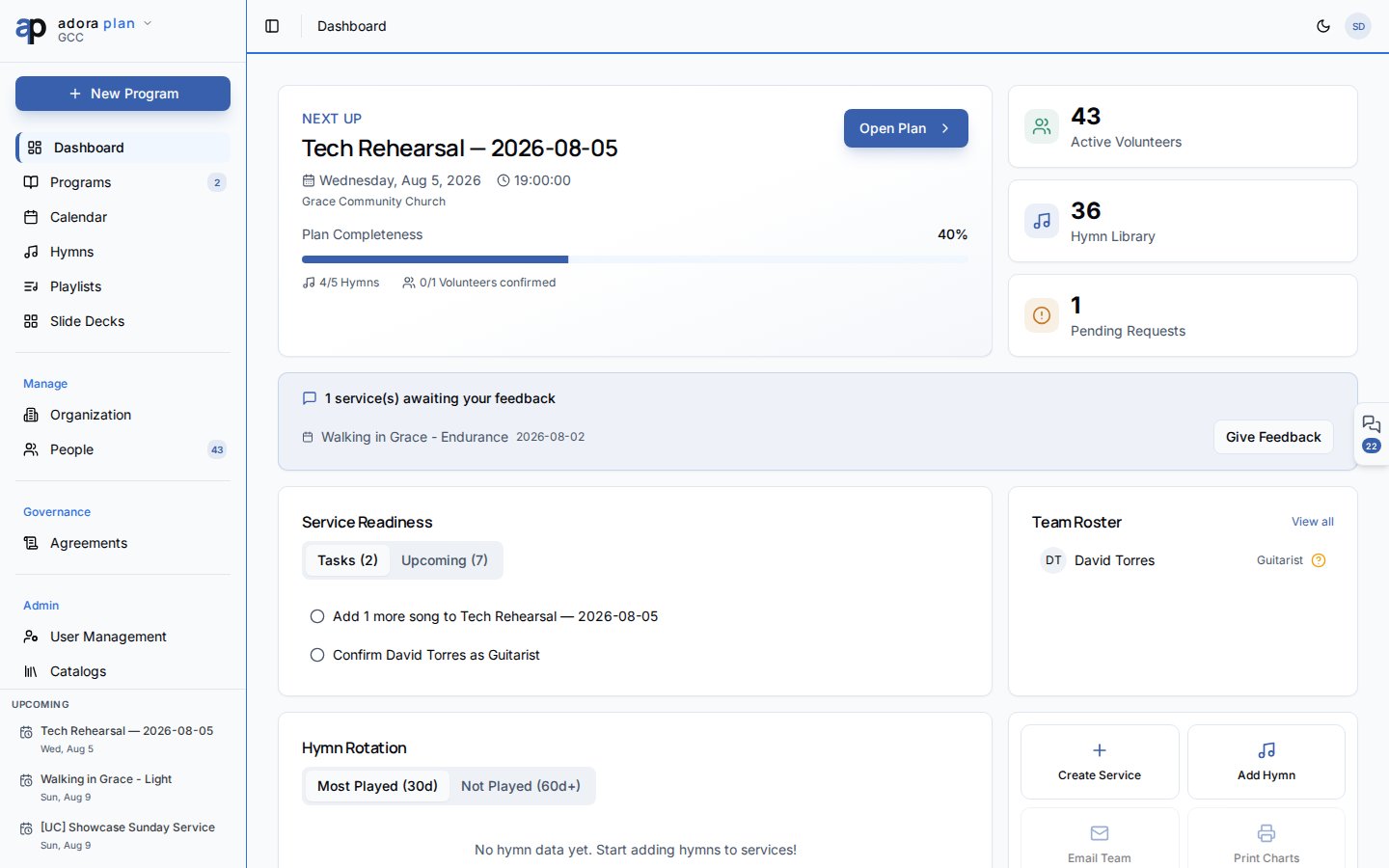
2. You land on **Dashboard** — your planning home.
3. Explore the sidebar: **Dashboard**, **Programs**, **Calendar**, **Hymns**, **Playlists**.
4. Click **Create Service** to start your first **Program**.
5. Open **Hymns** and add at least one song before building the **Service Order**.
***
## How-to Guide
### Tour the Dashboard
The hero card shows your nearest **Program**. Use **Open Plan** or **Create Service**.
Three cards summarize active volunteers, hymn library size, and pending requests.
Switch between **Tasks** and **Upcoming** to see what still needs attention.
Jump directly to **Create Service** or **Add Hymn**.
### Learn the sidebar
| Item | Use it to… |
| ------------- | --------------------------------------- |
| **Dashboard** | See what is next and what is overdue |
| **Programs** | List, create, and edit worship services |
| **Calendar** | View programs and events on a timeline |
| **Hymns** | Manage your song library |
| **Playlists** | Group songs (advanced) |
Account settings (profile, notifications, billing) live under your avatar menu → **Account**.
Complete the **Getting started** checklist on the Dashboard if you are setting up a new church. It walks through your first program, people, invites, and songs.
***
## Related
Step-by-step first program walkthrough.
Full guide to the Service Order editor.
Overview of AdoraPlan, AdoraCare, and AdoraCounsel.
## Quick Start
1. Sign in at [app.adoraplan.com](https://app.adoraplan.com).
2. You land on **Dashboard** — your planning home.
3. Explore the sidebar: **Dashboard**, **Programs**, **Calendar**, **Hymns**, **Playlists**.
4. Click **Create Service** to start your first **Program**.
5. Open **Hymns** and add at least one song before building the **Service Order**.
***
## How-to Guide
### Tour the Dashboard
The hero card shows your nearest **Program**. Use **Open Plan** or **Create Service**.
Three cards summarize active volunteers, hymn library size, and pending requests.
Switch between **Tasks** and **Upcoming** to see what still needs attention.
Jump directly to **Create Service** or **Add Hymn**.
### Learn the sidebar
| Item | Use it to… |
| ------------- | --------------------------------------- |
| **Dashboard** | See what is next and what is overdue |
| **Programs** | List, create, and edit worship services |
| **Calendar** | View programs and events on a timeline |
| **Hymns** | Manage your song library |
| **Playlists** | Group songs (advanced) |
Account settings (profile, notifications, billing) live under your avatar menu → **Account**.
Complete the **Getting started** checklist on the Dashboard if you are setting up a new church. It walks through your first program, people, invites, and songs.
***
## Related
Step-by-step first program walkthrough.
Full guide to the Service Order editor.
Overview of AdoraPlan, AdoraCare, and AdoraCounsel.